Notice:
This documentation is out of date
It is being retained for future reference and may become relevant again in the future
Last reviewed: Nov 2025
[DEPRECATED] Create OpenScienceLab Notifications
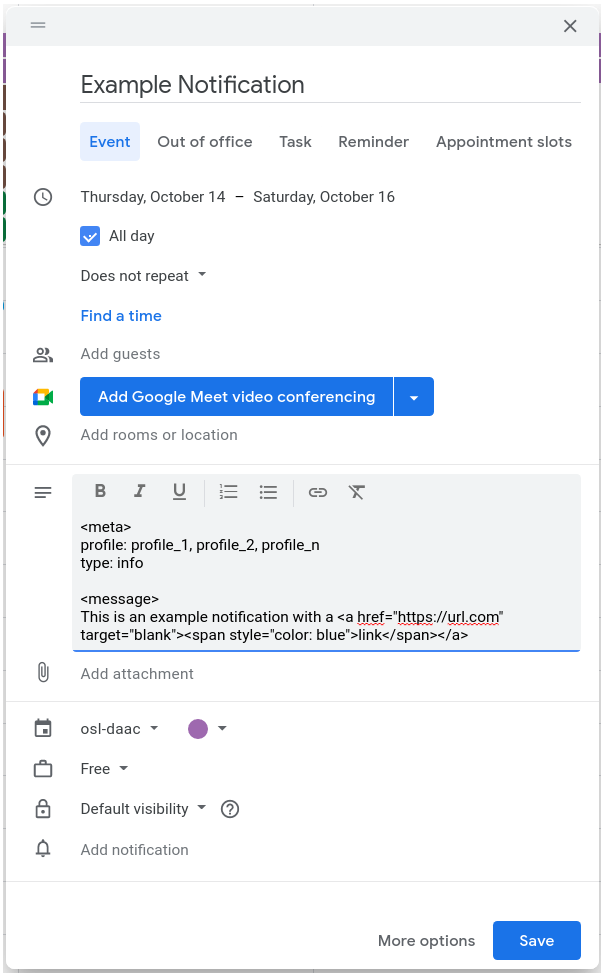
Create a new event in your notification calendar
The event title corresponds to the notification title
Select the time or date range for which you would like to display the notification
The remaining notification details are included in the event description
Add a
<meta>tagDefine profiles for which to display notification (profile names may contain spaces)
profile: profile_1, profile_2, profile_nNote: comma separated with no spaces
Define notification type
type: infois bluetype: warningis yellowtype: successis greentype: erroris red
Optional hide notification
mute: true
Add a
<message>tagAdd your message body as html
Add line breaks
</br>
Add links
<a href="https://url.com" target="blank"><span style="color: blue">link</span></a>Note: You must unlink the URL using the unlink button in the calendar message tool bar for it to work.
Turn off text automated formatting
Select all the text in the message body
Click the remove formatting button in the message toolbar